Adjusting constraints at runtime
Deciding the correct weight and level for each constraint is not easy. It often involves negotiating with different stakeholders and their priorities. Furthermore, quantifying the impact of soft constraints is often a new experience for business managers, so they’ll need a number of iterations to get it right.
Don’t get stuck between a rock and a hard place. Provide a UI to adjust the constraint weights and visualize the resulting solution, so the business managers can tweak the constraint weights themselves:
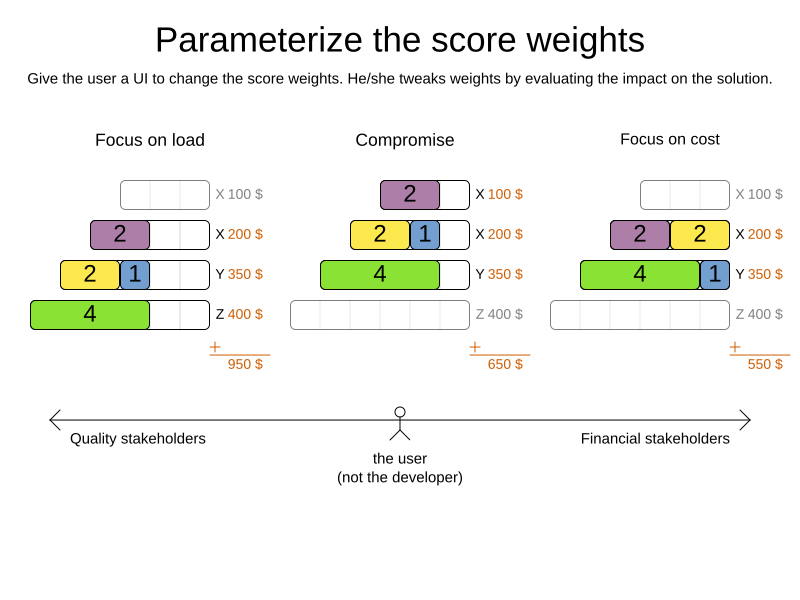
1. Defining constraint weights
Let’s define three constraints:
-
Constraint with a name of
Vehicle capacityand a weight of `1hard'. -
Constraint with a name of
Service finished after max end time, also with a weight of1hard. -
Constraint with a name of
Minimize travel timeand a weight of1soft.
Using the Constraint Streams API, this is done as follows:
-
Java
public class VehicleRoutingConstraintProvider implements ConstraintProvider {

    public static final String VEHICLE_CAPACITY = "Vehicle capacity";
    public static final String SERVICE_FINISHED_AFTER_MAX_END_TIME = "Service finished after max end time";
    public static final String MINIMIZE_TRAVEL_TIME = "Minimize travel time";

    ...

    @Override
    public Constraint[] defineConstraints(ConstraintFactory factory) {
        return new Constraint[] {
                vehicleCapacity(factory),
                serviceFinishedAfterMaxEndTime(factory),
                minimizeTravelTime(factory)
        };
    }

    Constraint vehicleCapacity(ConstraintFactory factory) {
        return factory.forEach(Vehicle.class)
                ...
                .penalize(HardSoftScore.ONE_HARD, ...)
                .asConstraint(VEHICLE_CAPACITY);
    }

    Constraint serviceFinishedAfterMaxEndTime(ConstraintFactory factory) {
        return factory.forEach(Visit.class)
                ...
                .penalize(HardSoftScore.ONE_HARD, ...)
                .asConstraint(SERVICE_FINISHED_AFTER_MAX_END_TIME);
    }

    Constraint minimizeTravelTime(ConstraintFactory factory) {
        return factory.forEach(Vehicle.class)
                ...
                .penalize(HardSoftScore.ONE_SOFT, ...)
                .asConstraint(MINIMIZE_TRAVEL_TIME);
    }
}
Using static string constants for constraint names is recommended.
It prevents typos and ensures the constraint name is consistent across the ConstraintProvider
and any code that references constraints by name, such as when applying overrides.
|
2. Enabling weight overrides
Without anything else, the constraint weights are fixed to the values specified in the ConstraintProvider.
To be able to override these weights at runtime, add a ConstraintWeightOverrides field
to the planning solution class:
-
Java
@PlanningSolution
public class VehicleRoutePlan {

    ...

    ConstraintWeightOverrides<HardSoftScore> constraintWeightOverrides;

    void setConstraintWeightOverrides(ConstraintWeightOverrides<HardSoftScore> constraintWeightOverrides) {
        this.constraintWeightOverrides = constraintWeightOverrides;
    }

    ConstraintWeightOverrides<HardSoftScore> getConstraintWeightOverrides() {
        return constraintWeightOverrides;
    }

    ...
}
The field will be automatically exposed as a problem fact,
there is no need to add a @ProblemFactProperty annotation.
3. Applying overrides
How overrides are applied depends on whether Timefold Solver is used as a library or as a service.
3.1. Using the library
Populate ConstraintWeightOverrides with the desired weights and set it on the solution before solving:
-
Java
...

var constraintWeightOverrides = ConstraintWeightOverrides.of(
    Map.of(
        VehicleRoutingConstraintProvider.VEHICLE_CAPACITY, HardSoftScore.ofHard(2),
        VehicleRoutingConstraintProvider.SERVICE_FINISHED_AFTER_MAX_END_TIME, HardSoftScore.ZERO
    )
);

var solution = new VehicleRoutePlan();
solution.setConstraintWeightOverrides(constraintWeightOverrides);

...
The Vehicle capacity constraint in this planning solution has a weight of 2hard,
as opposed to its original 1hard.
The Service finished after max end time constraint has a weight of 0hard,
and therefore will be disabled entirely.
The string keys passed to ConstraintWeightOverrides.of(…) must match the constraint ID,
which is the value given to asConstraint(…) when building your constraints.
Using the static string constants defined in the ConstraintProvider eliminates this risk.
|
In this way, you can solve the same problem by applying different constraint weights to each instance. Once solved, you can compare the results and decide which set of weights is the most suitable for your use case.
3.1.1. Sending overrides over the wire
Overrides are part of the planning solution, and as such they are automatically serialized into JSON using Jackson, assuming either of the following conditions are met:
-
You use Timefold Solver’s Quarkus integration,
-
you use Timefold Solver’s Spring Boot integration,
-
or you directly included the
timefold-solver-jacksonmodule in your project.
Overrides doesn’t natively deserialize from JSON back to Java objects.
This is because we have no way of knowing which Score implementation you may be using.
However, deserialization is easy to implement yourself by extending AbstractConstraintWeightOverridesDeserializer
and registering it with Jackson’s ObjectMapper.
3.2. Using the service
|
This page describes features which are only relevant when running Timefold Solver as a service. The information on these pages may describe functionality which may be changed or even removed in a future release. |
Constraint weights are always an interpretation by the modeler.
It might be that the consumer of the model would like to see the constraints weighed differently.
ModelConfigOverrides allows consumers of a model to tailor constraint weights to their use case.
| Be careful not to make your model overly configurable as that impacts usability. Usually, it doesn’t make sense to allow weight overrides for hard constraints. |
Implement the ModelConfigOverrides interface. This is a marker interface, meaning it has no methods but can be discovered by the SDK.
The implementation should have fields that refer to specific constraints using the @ConstraintReference annotation,
referencing the static string constants defined in the ConstraintProvider:
-
Java
-
Kotlin
public class TimetableConstraintProvider implements ConstraintProvider {

    public static final String TEACHER_CONFLICT = "Teacher conflict";
    public static final String ROOM_CONFLICT = "Room conflict";

    Constraint roomConflict(ConstraintFactory constraintFactory) {
        return constraintFactory
                // constraint implementation excluded
                .asConstraint(ROOM_CONFLICT);
    }

    Constraint teacherConflict(ConstraintFactory constraintFactory) {
        return constraintFactory
                // constraint implementation excluded
                .asConstraint(TEACHER_CONFLICT);
    }

    // other constraints excluded
}
class TimetableConstraintProvider : ConstraintProvider {
companion object {
const val TEACHER_CONFLICT = "Teacher conflict"
const val ROOM_CONFLICT = "Room conflict"
}
fun roomConflict(constraintFactory: ConstraintFactory): Constraint {
return constraintFactory
// constraint implementation excluded
.asConstraint(ROOM_CONFLICT)
}
fun teacherConflict(constraintFactory: ConstraintFactory): Constraint {
return constraintFactory
// constraint implementation excluded
.asConstraint(TEACHER_CONFLICT)
}
// other constraints excluded
}-
Java
-
Kotlin
public final class TimetableConfigOverrides implements ModelConfigOverrides {

    public static final long DEFAULT_WEIGHT_ZERO = 0L;
    public static final long DEFAULT_WEIGHT_ONE = 1L;

    @ConstraintReference(TimetableConstraintProvider.TEACHER_CONFLICT)
    private long teacherConflictWeight = DEFAULT_WEIGHT_ONE;

    @ConstraintReference(TimetableConstraintProvider.ROOM_CONFLICT)
    private long roomConflictWeight = DEFAULT_WEIGHT_ONE;

    // getter/setter excluded

}
data class TimetableConfigOverrides(
@ConstraintReference(TimetableConstraintProvider.TEACHER_CONFLICT)
val teacherConflictWeight: Long = DEFAULT_WEIGHT_ONE,
@ConstraintReference(TimetableConstraintProvider.ROOM_CONFLICT)
val roomConflictWeight: Long = DEFAULT_WEIGHT_ONE
) : ModelConfigOverrides {
companion object {
const val DEFAULT_WEIGHT_ZERO = 0L
const val DEFAULT_WEIGHT_ONE = 1L
}
}The default constraint weight for these constraints is 1.
This can now be overridden by the consumer by passing the overrides object in a request.
For example, to make the Teacher conflict 10 times more impactful, override the weight to 10:
{
    "config": {
      "run": {
        "name": "run name",
        <some fields excluded>
      },
      "model": {
        "overrides": {
          "teacherConflictWeight": 10
        }
      }
    },
    "modelInput" : "<ModelInput class as JSON>"
}
Next, in the model converter, map the overrides
to a ConstraintWeightOverrides object and set it on the @PlanningSolution class
as described above:
-
Java
-
Kotlin
TimetableConfigOverrides modelConfigOverrides = modelConfig.overrides();

ConstraintWeightOverrides<HardMediumSoftLongScore> constraintWeightOverrides = ConstraintWeightOverrides.of(
        Map.ofEntries(
                Map.entry(TimetableConstraintProvider.TEACHER_CONFLICT,
                        HardMediumSoftLongScore.ofHard(modelConfigOverrides.getTeacherConflictWeight())),
                Map.entry(TimetableConstraintProvider.ROOM_CONFLICT,
                        HardMediumSoftLongScore.ofSoft(modelConfigOverrides.getRoomConflictWeight()))
        )
);

solverModel.setConstraintWeightOverrides(constraintWeightOverrides);
val modelConfigOverrides = modelConfig.overrides()
val constraintWeightOverrides = ConstraintWeightOverrides.of(
mapOf(
TimetableConstraintProvider.TEACHER_CONFLICT to
HardMediumSoftLongScore.ofHard(modelConfigOverrides.teacherConflictWeight),
TimetableConstraintProvider.ROOM_CONFLICT to
HardMediumSoftLongScore.ofSoft(modelConfigOverrides.roomConflictWeight)
)
)
solverModel.constraintWeightOverrides = constraintWeightOverrides4. Passing parameters to constraints
In some cases, constraints need to be parameterized as different data sets may have different requirements for the same constraint. For example, a constraint may have to switch the minimum required pause length between two shifts, based on the laws of the country that the data set is dealing with.
To achieve this, you could have many variants of the same constraint in ConstraintProvider
and disable some of them using overrides.
To avoid the code duplication that this would have caused,
it is arguably better to have a single constraint that can be parameterized.
This section shows how to achieve this
using the Constraint Streams API.
First, create a new class to hold the parameters for the constraint.
For this document, we call it ConstraintParameters,
but you’re free to choose any name you like:
-
Java
public record ConstraintParameters(int minimumPauseInMinutes) {
}
Then, add a field of type ConstraintParameters to your planning solution
and annotate it with @ProblemFactProperty:
-
Java
@PlanningSolution
public class MyPlanningSolution {

    ...

    @ProblemFactProperty
    ConstraintParameters constraintParameters;

    ...

}
This will expose the ConstraintParameters as a problem fact,
making it available to the constraints.
Finally, use the join building block
to adjust the constraint implementation to use the parameters:
-
Java
public class MyConstraintProvider implements ConstraintProvider {

    ...

    Constraint minimumPauseBetweenShifts(ConstraintFactory factory) {
        return factory.forEach(Shift.class)
                .join(ConstraintParameters.class)
                .penalize(HardSoftScore.ONE_HARD, (shift, parameters) -> {
                    var pauseInMinutes = shift.getPauseInMinutes();
                    return Math.max(0, pauseInMinutes - constraintParameters.minimumPauseInMinutes());
                })
                .asConstraint("Minimum pause between shifts");
    }

    ...

}